hpe-networking-mcp system overview
For the current mental model — three router tools, RAG vs live APIs, dry-run and write gates, and read-only planners — start with How MCP and RAG work. This page is the runtime map. Per-release notes, including 0.11.0, are under Releases.
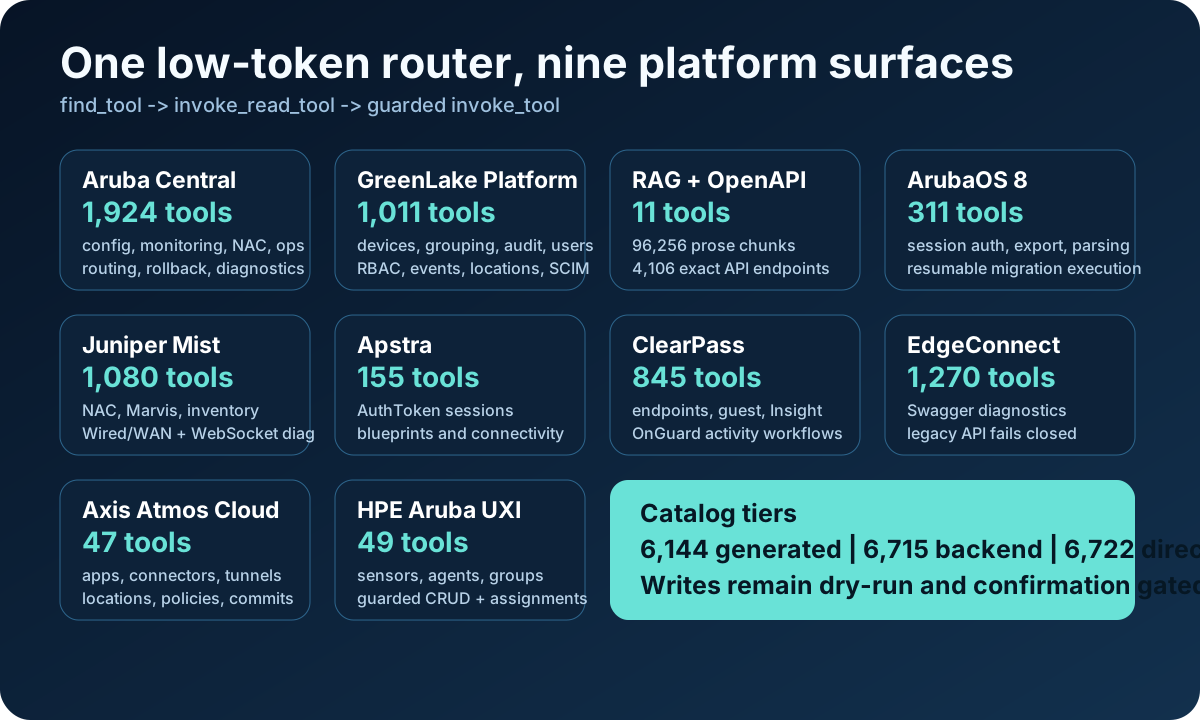
hpe-networking-mcp places a small MCP router in front of Aruba Central, GreenLake, documentation indexes, and opt-in product backends. Users discover a capability first, then dispatch the selected tool through a read-only or guarded write path.

Runtime in one screen
| Layer | Responsibility |
|---|---|
| MCP client | Sends natural-language tasks and tool calls over stdio or streamable HTTP |
hpe-networking-mcp | Discovers tools, validates dispatch, applies safety rules, and bounds responses |
| Core backends | Central monitoring/config/ops/NAC, Central Streaming (WSS), GreenLake Platform, and RAG |
| Always-on local | interop-core Central ↔ Mist translation (no vendor credentials) |
| Optional backends | ClearPass, Mist, Apstra, ArubaOS 8, EdgeConnect, UXI, Axis, and design when enabled |
| Local indexes | Hybrid documentation retrieval, exact OpenAPI/advisory lookup, and semantic tool discovery |
| Vendor APIs | External REST systems reached by async HTTP clients; Streaming uses a bounded WSS collector |
Client boundary
The router is model-agnostic: VS Code/Copilot, Copilot CLI, Claude, Crush, MCPJam, LibreChat, and Open WebUI own model selection, chat memory, and host approval UX. Keep the router focused on discovery, dispatch, safety, and transport.
The normal MCP profile keeps the client-visible surface small:
HPE_MCP_ROUTER_MODE=minimal
HPE_MCP_TOOLSETS=central,glp,rag
Optional products are disabled until explicitly enabled:
HPE_MCP_PRODUCTS=clearpass,mist,apstra,aos8,edgeconnect,uxi,axis,design
The full catalog contains 6,145 generated operations and 6,732 backend tools when every platform and guarded write is indexed. Minimal mode exposes only find_tool, invoke_read_tool, and invoke_tool to the MCP client.
Tool discovery and dispatch
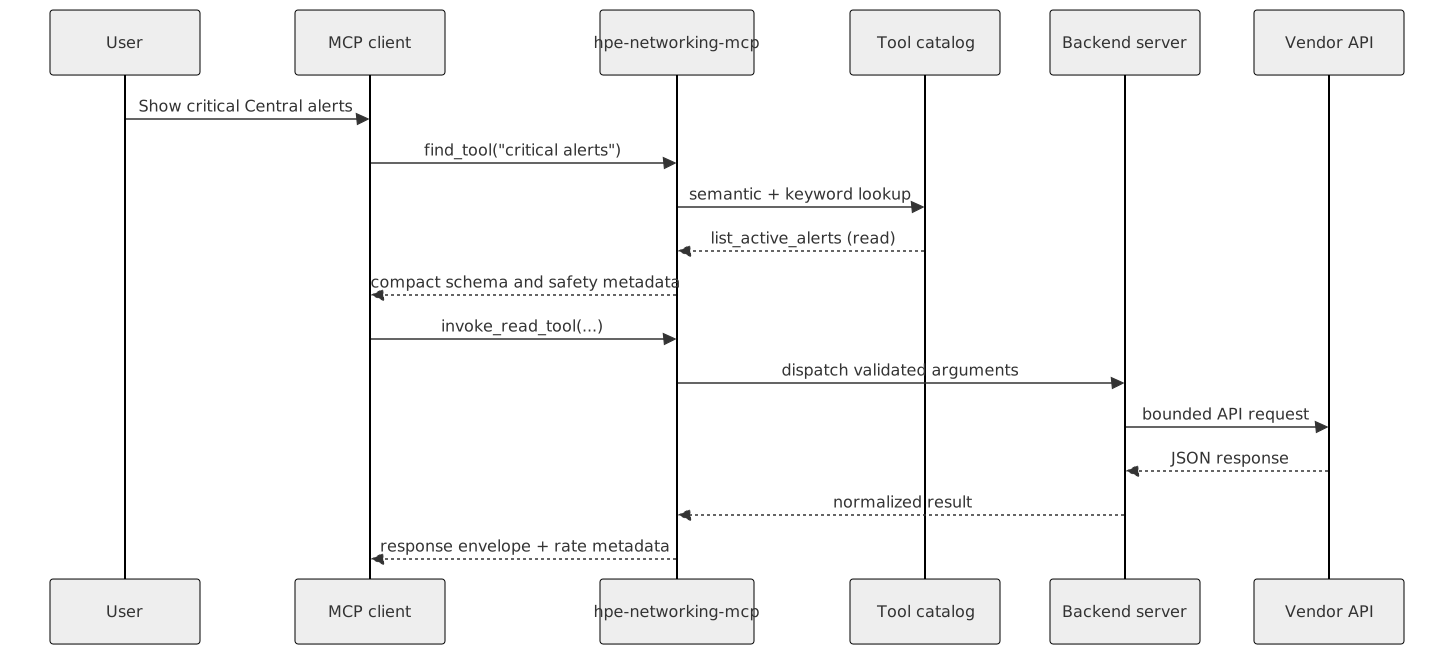
Use invoke_read_tool for normal investigations. Use invoke_tool only when the user intentionally asks for a write or destructive action; it is marked destructive because it can dispatch any enabled backend tool.
Write-safety enforcement

Access profiles: custom preserves the existing mixed platform gates, safe-read-only blocks writes globally, and full-read-write enables ordinary writes on every loaded platform. Dry-run, confirmation, elicitation, and dedicated destructive safeguards remain in force.
Documentation and index flow

ask_docsandsearch_docsuse the hybrid documentation index.lookup_apireads parsed OpenAPI data from SQLite without lossy embedding.find_toolsearches the tool catalog and returns compact schemas and safety metadata.- Ingestion commands rebuild local artifacts under
data/; those generated files are intentionally git-ignored.
Transport and deployment

| Deployment | Configuration | Security boundary |
|---|---|---|
| stdio | Client launches src/hpe_networking_mcp/mcp_servers/tool_router.py | Local child process |
| Local HTTP | MCP_TRANSPORT=streamable-http, loopback listener | Same-host clients |
| Non-loopback HTTP | Streamable HTTP plus allowed hosts/origins; optional bearer token | Explicit network and authentication controls |
See MCP client recipes for copy/paste configurations.
Local setup and validation
scripts/setup_wizard.py can run install, offer common Central API gateway choices, fill credentials without echoing secrets, and enable only the optional products you choose. scripts/doctor.py is intentionally non-mutating and does not call Central, GLP, or optional product APIs. It checks local dependencies, credentials/config paths, indexes, RAG source-manifest drift, router profile drift, HTTP URL/transport mismatches, optional product env, and listener status.
Repository map
.claude/                 Optional launch profiles and repo agent notes
.cursor/                 Cursor MCP profiles
.vscode/                 VS Code MCP example config
config/                  Credentials template
docs/                    User, architecture, setup, router, and product docs
ingestion/               Docs/API ingestion into LanceDB and SQLite
inputs/                  Example migration input templates
src/hpe_networking_mcp/mcp_servers/             MCPServer backends and low-token router
src/hpe_networking_mcp/pipeline/                Clients, migration stages, SSID helpers
resources/               API/Postman reference notes and resources
scripts/                 Local doctor, HTTP router helper, catalog/personal ingest, release validation
tests/                   Unit, integration, and eval coverage

.mcp.json.example        Generic stdio MCP client example
.mcp.http.json.example   Generic streamable HTTP MCP client example
docker-compose.yml       Optional localhost-only Redis/Ollama server backend
run_pipeline.py          Checkout wrapper for `hpe-mcp-run-pipeline`
run_ssid.py              Checkout wrapper for `hpe-mcp-run-ssid`
Generated local artifacts are intentionally git-ignored:
config/credentials.yaml
.env
.mcp.json
.mcp.http.json
data/
state/
outputs/
ingestion/sources/
ingestion/markdown*/
The optional Redis/Ollama Docker helper uses Docker named volumes for service state, so it does not create repo-local redis_data/ or ollama_data/ directories on new setups.
Migration and source provenance
The AOS8 migration path is separate from the generic eight-stage CSV hpe_networking_mcp.pipeline. It establishes UIDARUBA/X-CSRF sessions, exports WLANs, roles, VLANs, AP groups, controllers, and policies, normalizes those objects, and produces separate Classic Central and New Central candidates with warnings, deterministic diffs, and read-only verification plans.
OpenAPI inputs are reproducible:
- Aruba reference pages resolve
oasPublicUrlthrough 25 tracked ReadMe API registries. - Mist API version 2606.1.1 is pinned from the official
mistsys/mist_openapirepository and SHA-256 verified. - Weekly CI checks detect registry hash or Mist upstream drift.
- Structured OpenAPI records are stored only in
data/specs.sqlite; the 392,471-row LanceDB table remains a prose retrieval corpus.