hpe-networking-mcp — HPE Networking MCP toolkit
Low-token Model Context Protocol tooling for HPE Aruba Central, HPE GreenLake Platform, embedded docs/API lookup, and optional ClearPass, Mist, Apstra, ArubaOS 8, EdgeConnect, UXI, and Axis backends.
MCP lets an AI client — Claude Code, Copilot, Cursor, VS Code, or another MCP-capable host — call a common toolbox instead of a bespoke plugin per vendor. This project is one such server: point any MCP client at it and it exposes a searchable HPE networking tool catalog behind a small, low-token surface.
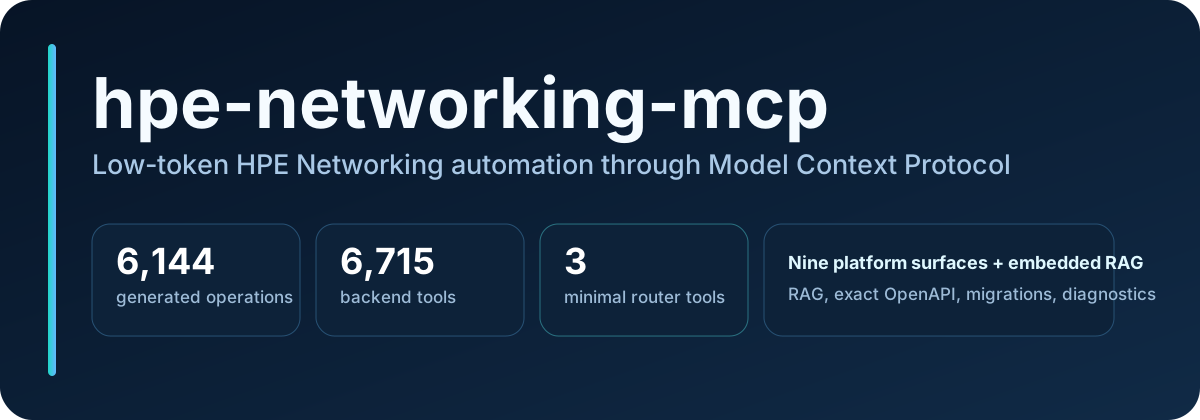
Whatever backend does the work, an MCP client sees only three router tools under the recommended minimal profile — the banner’s “3 minimal router tools” figure is the number that matters most for context budget. See How MCP and RAG work for the full path.
Who it’s for
- First-time MCP users. New to hpe-networking-mcp or to MCP itself. Start with the five-minute credential-free quickstart below, then Getting started for credentials and a real MCP client connection.
- Aruba network operators. Already run Aruba Central or GreenLake Platform day to day. Jump to Example prompts for ready-made call patterns, or the typed product workflow roadmap For Juniper/Mist SKU selection, citations, and the JVD design/build boundary, see Juniper/Mist and JVD workflow. for ClearPass, Mist, Apstra, AOS8, EdgeConnect, and UXI tasks.
- hpe-networking-mcp developers. Extending a backend, adding a tool, or reviewing the router internals. Start with How MCP and RAG work, System overview, and Tool router.
Five-minute credential-free quickstart
Verify the install, build the router catalog, and start the MCP HTTP server before adding any Aruba Central or GreenLake Platform credentials. API-backed tools need credentials later, but this path is safe to try first with fake or no account details at all.
Two install paths, same destination. What each gives you, before you pick:
| What you get | Option A — published image | Option B — source checkout |
|---|---|---|
Router tools + exact-API lookup (lookup_api; spec index baked into the image) | Yes | Yes |
Prose docs RAG (search_docs / ask_docs) | Not included — needs an INSTALL_EXTRAS=ingestion rebuild plus a corpus you fetch and build yourself (end-to-end checklist) | The same two pieces: the ingestion extra, plus the same self-built corpus |
Guided first run (scripts/setup_wizard.py) | No — the container starts straight into the router | Yes — --docker also provisions the container path (secrets, generated compose overlay, .env; see Docker deployment) |
Option A — pull the published image (no checkout): one docker run, credential-free, for a look at the tool surface. The command and what it does (and does not) include live in Docker deployment → Kicking the tyres.
For a real containerized deployment — credentials, optional products, write gates — start at Docker deployment; its four steps are git clone, python3 scripts/setup_wizard.py --docker, docker compose ... up -d mcp-router, curl .../livez.
Option B — build from source (adds the setup wizard, doctor diagnostics, and local index tooling) — the six checkpoints below:

Clone hpe-networking-mcp.
git clone https://github.com/secure-ssid/hpe-networking-mcp.git
cd hpe-networking-mcp
Expected outcome: a local hpe-networking-mcp/ working copy with no network calls beyond the clone itself.
On Windows hosts, build and run from a shell with LF line endings (WSL2 or a configured checkout) — CRLF checkouts break the entry scripts inside Docker builds.
Run the wizard without credentials.
python3 scripts/setup_wizard.py --yes --skip-credentialsExpected outcome: dependencies install, local git-ignored config files are created, and the wizard reports each completed phase without contacting Central or GLP.
Check the doctor.
uv run hpe-mcp-doctor
Expected outcome: a non-mutating local report — dependencies, config paths, and index status each print OK or a specific fix, with no vendor API calls.
Connect over streamable HTTP.
MCP_PORT=8010 bash scripts/run_http_router.sh
Expected outcome: a Uvicorn running on http://127.0.0.1:8010 line. Point any MCP-capable client at http://127.0.0.1:8010/mcp.
Discover a tool.
find_tool("ask Aruba docs with citations")
Expected outcome: a compact match list that includes ask_docs, which only reaches the local embedded RAG index — no credentials required.
Call it safely.
invoke_read_tool("ask_docs", {"question": "WPA3 SAE transition mode", "top_k": 5})
Expected outcome: a short, cited answer from the embedded docs index. invoke_read_tool refuses any tool that is not annotated read-only, so this step cannot reach a write path by accident.
For the full guided path with credentials, region selection, and optional products, see Getting started and MCP client recipes.
Connect it in your client
Point Claude, Copilot, VS Code, Cursor, or any other MCP-capable host at the running server and it sees only the three router tools — copy/paste stdio and HTTP configs for each client are in MCP client recipes.
Write safety at a glance

READ DIAGNOSTIC WRITE DESTRUCTIVE
Every backend tool carries one of these annotations, and the router enforces them before dispatch:
Default-safe: invoke_read_tool only dispatches tools annotated READ. DIAGNOSTIC tools use invoke_tool, while writes follow HPE_MCP_ACCESS_PROFILE: safe-read-only, compatibility-preserving custom, or full-read-write.
Guarded writes: use dry_run=True first when the tool supports it. Real execution then requires the tool’s explicit confirmation mechanism: a confirm=True argument or MCP elicitation, depending on the schema.
invoke_tool is destructive: it is the only dispatcher that can reach WRITE and DESTRUCTIVE tools, so it is annotated destructive even for a read-only call. Use invoke_read_tool unless a write is intended.
See Tool router for the complete discovery/dispatch model and Optional product starters for the per-platform write-gating matrix.
Optional products
Enable only the product starters you want in the current session:
python3 scripts/setup_wizard.py --products clearpass,mist
Available starters:
| Product | Variables |
|---|---|
| ClearPass | CLEARPASS_BASE_URL, CLEARPASS_API_TOKEN |
| Juniper Mist | MIST_HOST, MIST_API_TOKEN |
| Apstra | APSTRA_BASE_URL, preferred APSTRA_USERNAME/APSTRA_PASSWORD, optional APSTRA_API_TOKEN |
| ArubaOS 8 | AOS8_BASE_URL, preferred AOS8_USERNAME/AOS8_PASSWORD, optional AOS8_API_TOKEN, optional AOS8_CLIENT_IP, optional AOS8_SESSION_TTL_SECONDS |
| EdgeConnect | EDGECONNECT_BASE_URL, EDGECONNECT_API_TOKEN, optional EDGECONNECT_AUTH_HEADER, endpoint-specific EDGECONNECT_AI_SESSION_AUTHORIZATION |
| HPE Aruba UXI | UXI_CLIENT_ID, UXI_CLIENT_SECRET, optional UXI_BASE_URL, optional UXI_TOKEN_URL |
| Axis Atmos Cloud | AXIS_BASE_URL, AXIS_API_TOKEN |
| Network design diagrams (Draw.io / Graphviz / NeXt) | none required; optional HPE_MCP_DIAGRAM_ICON_DIR |
See the optional product matrix for the full setup and safety model. Use HPE_MCP_ACCESS_PROFILE=full-read-write for every loaded platform, or keep custom with HPE_MCP_PRODUCT_ACCESS=read-write / a narrower HPE_MCP_<PLATFORM>_WRITES=1 override.
Project snapshot
| Area | Current snapshot |
|---|---|
| Tool catalog | 6,145 generated operations (6,128 active) / 585 curated / 6,732 backend tools / 6,751 direct-all |
| Capability totals (platform APIs) | 3,161 read, 165 diagnostic, 2,545 write, 842 destructive |
| RAG | 392,471 prose chunks in LanceDB across 30 scraped sources |
| Structured lookup | 2,734 endpoints, 6,363 schemas, 31,432 fields, 104 advisories, 345 lifecycle records |
| API provenance | Aruba ReadMe registries, official Mist/Apstra sources, pinned GLP and EdgeConnect snapshots, SHA-pinned Axis generator |
| Optional platforms | ClearPass, Mist, Apstra, AOS8, EdgeConnect, UXI, Axis Atmos Cloud, plus the credential-free design diagram tools |
| Safety | Per-platform gates, dry-run writes, confirmation, HTTP host/origin and bearer controls, credential-gated live-test config, versioned/redacted artifact contracts |
Per-backend counts and coverage live in the tool catalog; reproducible comparisons against other HPE Networking MCP servers are in the capability gap matrix. The latest published (tagged) release is 0.8.0. 0.10.0 notes describe in-tree main; 0.9.0 is archived. Older notes are under Releases in the sidebar.
Continue
- New to hpe-networking-mcp: Getting started
- Running Aruba/GLP tasks today: Example prompts
- Running it in a container: Docker deployment
- Building or reviewing a backend: Tool router
- Every other guide and reference page: the sidebar navigation
Project links
Community and support
- Support guide - where to ask setup, usage, bug, and feature questions
- Contributing guide - local setup, validation, docs, and no-secret expectations
- Code of conduct - collaboration expectations
- Security policy - private vulnerability and credential-exposure reporting guidance
- GitHub issues - bug reports, feature requests, and support questions with fake or redacted details
Related projects and thanks
hpe-networking-mcp is an independent HPE Networking MCP toolkit. It is improved by watching the official MCP ecosystem and community work; thanks to these projects for useful patterns and references:
- HewlettPackard/gl-mcp - official GreenLake Platform MCP server
- modelcontextprotocol/python-sdk - MCP Python SDK
- KarthikSKumar98/central-mcp-server - community Aruba Central MCP server
- nowireless4u/hpe-networking-mcp - unified HPE networking MCP reference
Disclaimer
hpe-networking-mcp is an independent community project. It is not an official HPE or HPE Aruba Networking product and is not endorsed by or supported by HPE.
License
MIT - see the repository license.