How MCP and RAG work
This is the current mental model for hpe-networking-mcp. Counts come from docs/project-facts.json. Historical design notes live in system overview and RAG architecture. Per-release notes, including 0.11.0, are under Releases.
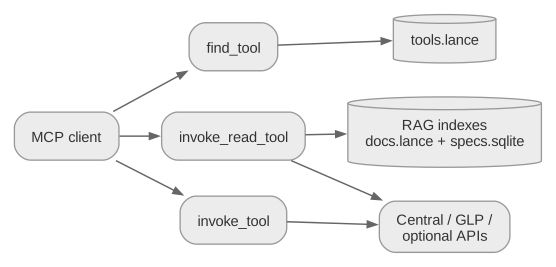
What the MCP client sees
The recommended profile is:
HPE_MCP_ROUTER_MODE=minimal
HPE_MCP_TOOLSETS=central,glp,rag
That profile publishes three router tools:
| Tool | Job |
|---|---|
find_tool | Search the local tool catalog. No vendor API call. |
invoke_read_tool | Run a read-only backend tool. Refuses writes and destructive tools. |
invoke_tool | Dispatch any enabled backend tool. Marked destructive because it can reach writes. |
The catalog behind those three tools currently holds 6,732 registered backend tools and 6,145 generated OpenAPI operations. Direct-all mode exposes 6,736 client-visible tools and is for debugging, not daily use.
Two kinds of answers
Ask the indexes first for knowledge. Ask live APIs only for tenant/device state.
| Question type | First tool | Store | Network |
|---|---|---|---|
Exact endpoint, schema, enum, operationId | lookup_api | data/specs.sqlite | none |
| CVE / vendor advisory ID | lookup_advisory | SQLite advisory tables | none |
| How-to, concepts, design guidance | ask_docs or search_docs | data/docs.lance | none |
| Which MCP tool should I call? | find_tool | data/tools.lance | none |
| Live health, alerts, inventory, config | find_tool then invoke_read_tool | vendor APIs | yes |
| Write / reboot / bounce / resync | find_tool then invoke_tool | vendor APIs | yes, gated |
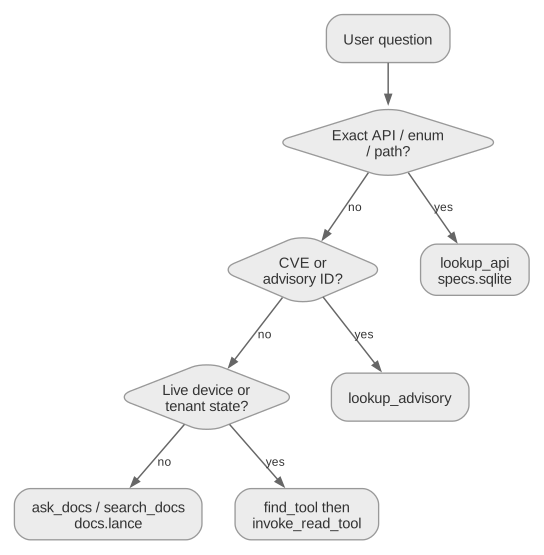
ask_docs already does that routing internally: a literal CVE/advisory ID goes to lookup_advisory, an API-shaped question goes to lookup_api, and only then does it fall back to prose RAG.
How RAG is built
Official sources are scraped into ingestion/sources/ (git-ignored), then ingested into local indexes under data/ (also git-ignored). Prebuilt indexes ship as GitHub Release assets.

| Index | File | Used by |
|---|---|---|
| Hybrid prose docs | data/docs.lance | search_docs, ask_docs |
| Exact OpenAPI + advisories | data/specs.sqlite | lookup_api, lookup_advisory, lifecycle tools |
| Tool catalog | data/tools.lance | find_tool |
Default embeddings are in-process fastembed (nomic-embed-text-v1.5). No Docker, Redis, or Ollama is required to clone and run. Redis Stack remains an optional server backend.
The current corpus is 392,471 prose chunks, 2,734 endpoints, 6,363 schemas, 31,432 fields, 104 advisories, and 345 lifecycle records across 18 declared RAG sources.
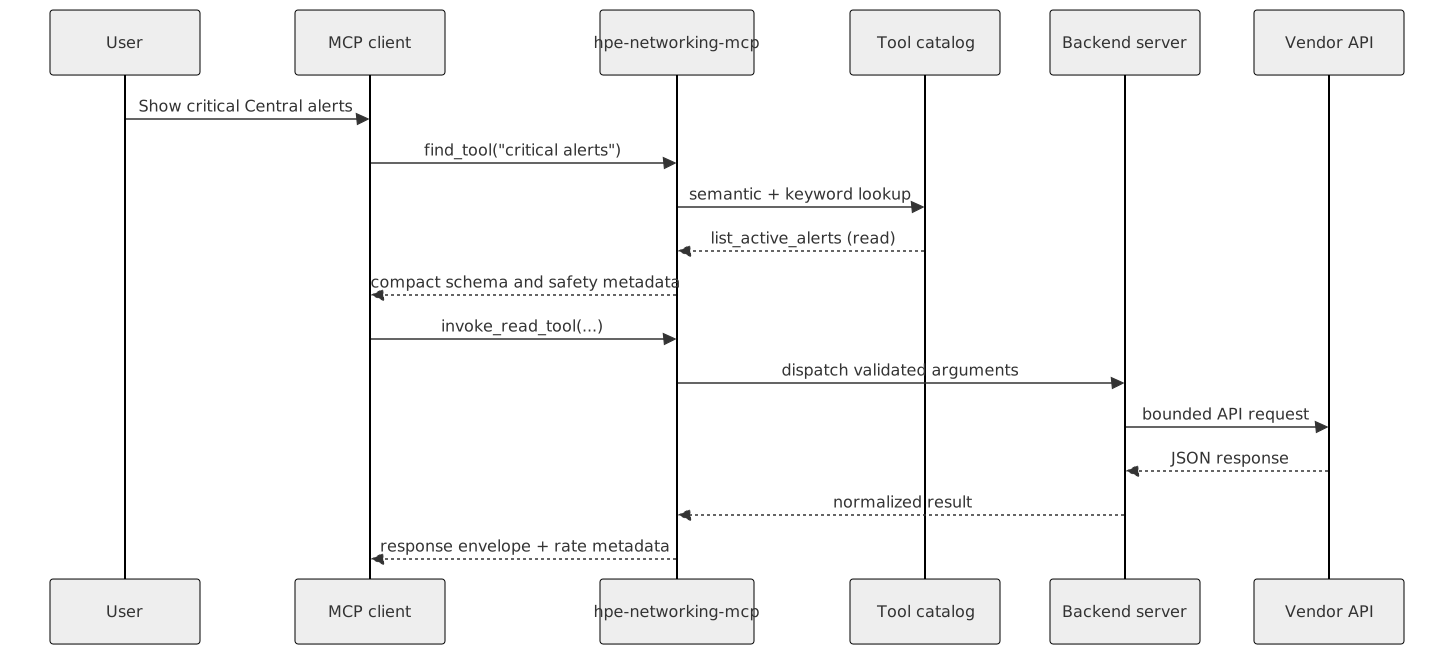
How a live call runs
find_tool("critical alerts")searches the catalog and returns compact schema plus safety metadata.- Reads go through
invoke_read_tool. Diagnostics/writes go throughinvoke_tool. - The router validates arguments, forwards them to the owning backend (
central-monitoring,glp-core,rag-core, …), and bounds the response.
Protocol-only Central Streaming is not a REST/OpenAPI wrapper. It is a bounded WebSocket collector (central_collect_streaming_events) with subscription preflight, reconnect limits, and redaction.
Write safety

- Dry run previews the payload and makes no vendor call.
- Gated means the platform write switch must be on (
HPE_MCP_CENTRAL_WRITES,HPE_MCP_GLP_V2BETA1_WRITES, and the other platform gates). - Confirm / elicitation is required before a real write or destructive action.
- Planning tools (
plan_device_troubleshooting,plan_site_troubleshooting,plan_config_health_remediation) are read-only. They recommend next tools withexecute=False. They do not reboot, bounce, or resync anything.
What loads by default
| Surface | Default | Notes |
|---|---|---|
central-* monitoring/config/ops/NAC | on with central toolset | Live Aruba Central REST |
central-streaming | on with Central | Protocol-only WSS collector |
glp-core | on with glp toolset | GreenLake Platform + local glp_preflight |
rag-core | on with rag toolset | Local indexes only |
interop-core | always | Credential-free Central ↔ Mist translation |
| ClearPass, Mist, Apstra, AOS8, EdgeConnect, UXI, Axis, design | opt-in | HPE_MCP_PRODUCTS / HPE_MCP_TOOLSETS |
Keep optional products off unless you need them. That is how the client token budget stays small.
Next reading
| If you need | Read |
|---|---|
| Runtime, transport, and repository map | System overview |
| Retrieval design, eval, and provenance | RAG architecture |
| Router modes and write contracts | Tool router |
| Per-backend counts | Tool catalog |
| Client setup | Getting started |